Browser sharing · No account required
Share clipboard text between your devices
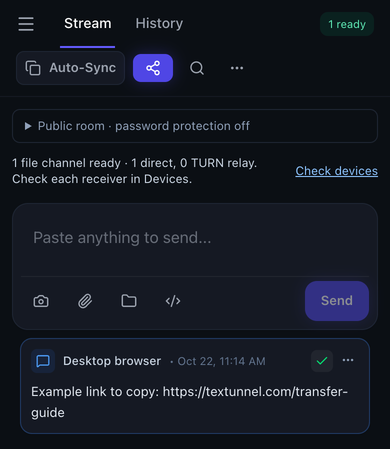
For a predictable workflow, open the same room on both devices, paste text into the composer and press Send. Use Copy on the receiving message. Auto-Sync is optional and depends on clipboard permissions, page focus and operating-system restrictions.
Send text to another device
Choose files or connect your devices to begin. Keep both pages open during transfer.
Direct-first · Internet relay needs permission
How to use it
- Open the same room on both devices. Set a room password before sharing sensitive text, especially if considering content relay.
- Paste text, a link or code into the composer and press Send. Messages have a 64 KiB encoded limit.
- Use Copy on the received message, then paste into the destination app. Verify the pasted content.
- For Auto-Sync, enable it on both devices and allow requested clipboard access. Keep both pages active; use manual Copy if automatic access is unavailable.
What to check in the room
Limits and connection conditions
On physical iPhone Safari, manual text sharing and a bidirectional clipboard round trip were checked. That does not establish unattended background clipboard synchronization across all apps or browsers.
- Text and clipboard messages: 64 KiB encoded message limit
- Use a file for larger content. Clipboard permissions and foreground access still apply.
- MQTT file fallback: 25 MiB per file
- Both peers must explicitly allow relay in their current tabs.
WebRTC transport is encrypted. Public-room MQTT content needs a room password for encryption against the broker. Internet content relay requires explicit permission in each tab. History and optional recovery use device storage; the site also uses analytics and advertising scripts.
Privacy, relay permission and full transfer guideVerified transfer workflows
Maintained by the Textunnel team · Content reviewed October 23, 2026 · Physical acceptance record: October 18, 2026
Physical iPhone Safari checks covered manual text exchange, clipboard paste-back and system share cancellation. Clipboard round-trip content matched; background Auto-Sync is not guaranteed.
These checks confirm the tested workflows, rather than a fixed transfer speed. For interrupted transfers, return to the page, reconnect and ask the sender to Retry.
Detailed transfer test resultsFrequently asked questions
Does Auto-Sync work everywhere in the background?
No. Browser permissions, user gestures, focus and phone background rules affect clipboard reads and writes. A shared notice does not prove the other system clipboard changed. Manual Send and Copy remain available.
Can I share a large document through the clipboard?
Text and clipboard messages have a 64 KiB encoded limit. Save larger content as a file and use file transfer instead. The encoded byte limit is not a fixed character count.
Is clipboard content private from the broker?
Direct WebRTC transport is encrypted. If you explicitly allow MQTT content relay in a public room, use a room password for payload encryption against the broker. Room codes, passwords and share links must be kept private.