Textunnel · No installation · No account required
Share files and text between your devices
Textunnel is a free browser tool for sharing files, links and text between devices. Open it on your phone and computer, join the same room, and send. No installation or account required.
Start here, then share the room code or QR with your other device.
Real-device check: iPhone Safari ↔ Mac
1 MiB and 64 MiB sent both ways; returned file hashes matched. Tested October 18, 2026.
Built for direct sharing on the same Wi-Fi. Keep both pages open. Online rooms need internet to connect; content relay is optional and needs your permission.
Connection detailsSee the transfer screens ↓Choose what to share
Select a file, folder or photo, or paste text. Then connect your devices to send it.
Choose files to send
Choose files or connect your devices to begin. Keep both pages open during transfer.
Share links and folder packing: up to 256 MiB. For larger single files, and select the file there. The receiver needs supported disk saving.
Direct-first · Internet relay needs permission
Inside Textunnel
Your first transfer, in three steps
Check the connection, confirm delivery, then save your file.
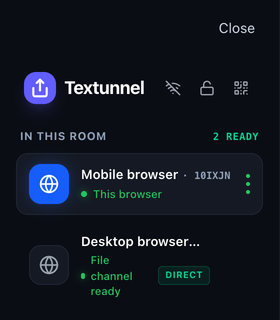
Connect your devices
Join the same room, then check File channel ready in the device panel.
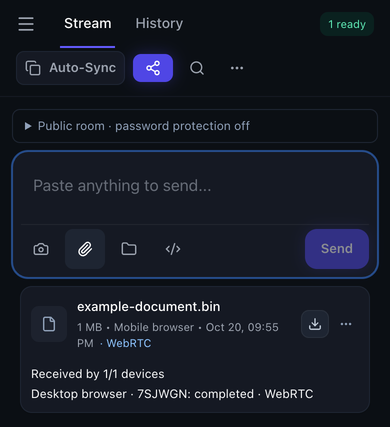
Check the file arrived
Send your file and wait for Received by 1/1 on the sending device.
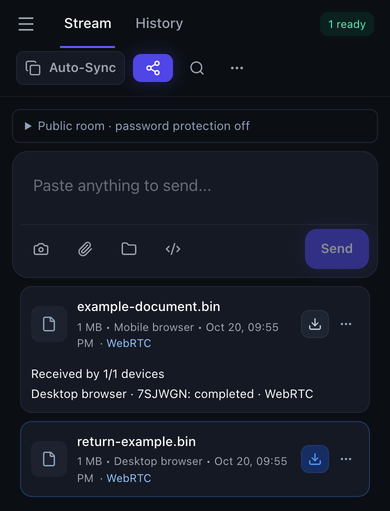
Save it on the receiver
Use Download to save the received file before closing or refreshing the page.
Real Textunnel interface, captured October 20, 2026 in controlled desktop-browser sessions at narrow widths. Example file and device names; these are not phone system screenshots or additional device test results.
Device missing or transfer not starting?
- Confirm the room code and password match on both devices. Return both browser pages to the foreground.
- Check whether your VPN permits local-network access. Guest Wi-Fi isolation and firewall rules can prevent a direct connection.
- Wait for File channel ready. After an interruption, reconnect and use sender Retry; reconnection alone does not restart a failed transfer.
- A DIRECT badge identifies a non-relay route; it does not prove the devices share Wi-Fi or that a VPN kept traffic on the LAN.
Choose your workflow
Use Textunnel for a one-time exchange while both devices are available: move a document to your computer, send a link to your phone or copy a code snippet into another browser. If the recipient needs to download later or you need a backup, choose a storage-backed workflow. Textunnel live share links need the source tab to stay open.
iPhone and computer
Choose from Files, receive in Safari and save before refreshing. Includes a real interface walkthrough.
Open workflow →Copy text to another device
Paste and Send, then Copy on the receiver. Use manual copying when browser clipboard access is unavailable.
Open workflow →Files over the same Wi-Fi
Check readiness, understand route labels and troubleshoot VPN or guest-network isolation.
Open workflow →Know how your data travels
Direct WebRTC
Browsers encrypt the data-channel transport. DIRECT means a non-relay route, not proof that traffic stayed on your Wi-Fi. Online discovery and signaling still need internet.
Optional internet relay
TURN and MQTT content relay require permission in each tab. TURN forwards encrypted WebRTC transport. For MQTT payload encryption against the broker, set a room password; public-room payloads otherwise lack that protection.
History and recovery
History stays in browser storage. Received file bytes normally live in the open page. Optional temporary recovery stores incomplete bytes locally, unencrypted at rest, for up to 10 minutes; clear it in Preferences.
The site also runs analytics and advertising scripts. Browser permissions and device security affect privacy. Read the privacy policy.
Tested with real devices
On October 18, 2026, iPhone Safari and a Mac on the same Wi-Fi exchanged 1 MiB and 64 MiB files over WebRTC. Saved files were sent back and their SHA-256 hashes matched. Rejection and interruption recovery were also checked.
Keep Safari in the foreground: uninterrupted lock-screen and background transfer did not pass. Returning to the page and using sender Retry resumed retained data in the tested cases.
See the dated test table, failures and test scopeQuestions before you start
How much text can I share?
Text and clipboard updates have a 64 KiB encoded message limit. Send larger content as a file. Clipboard access also depends on permissions, page focus and browser support.
How does Textunnel connect devices?
Online rooms use an internet discovery and signaling service. Files prefer a direct encrypted WebRTC channel. TURN and MQTT content relay require explicit permission in each tab; Direct only disables them. After permission, broker file fallback accepts up to 25 MiB. A DIRECT badge describes the selected route; it does not prove both devices are on the same Wi-Fi.
Is every room end-to-end encrypted?
WebRTC data channels use transport encryption. Online signaling uses an internet broker. Text and clipboard prefer the direct channel. If you explicitly allow content relay, public-room broker payloads are not encrypted against the broker unless you set a room password. Share links use their own secret. Share room codes and links only with intended receivers.
How large a file can I send?
After explicit relay permission, broker fallback accepts up to 25 MiB per file. Share links and folder packing accept up to 256 MiB. Receiving room files over 256 MiB requires a supported disk-saving API; browser and device limits still apply. No 50 GB transfer or fixed speed is guaranteed. Received downloads in the open room share a 512 MiB temporary cache; save files and clear the receiving stream when it is full.
Can it discover devices on the same Wi-Fi automatically?
Discovery uses an internet service and cannot prove that devices share a Wi-Fi network. If a device does not appear, open the same room code or share the room QR. The offline connection workflow exchanges two QR codes after both devices open the same room.
Does clipboard sync run while my phone is locked?
Clipboard sync must be enabled on both devices. Browser permissions, focus and system background restrictions apply. A received update may wait until the page is active. Manual copy is available when automatic access is unavailable.
What does a completed transfer mean?
The receiving app has verified the complete file, or text has been accepted by the receiving app. This does not mean a person has read it or that a browser download has been saved to disk. After reconnecting, the sender must Retry; reconnection alone does not restart a failed transfer. Room transfers can resume verified in-memory blocks for up to 10 minutes while both pages stay open, for browser-received files up to 256 MiB. To recover after refresh, enable temporary file recovery in receiver Preferences before transfer, then reselect the original source file on the sender. This stores incomplete file data locally, unencrypted at rest, for up to 10 minutes (expired data is removed when the app next runs). With temporary recovery enabled, disk-received files up to 256 MiB can resume after choosing a destination again. Share receivers can resume the same link; the sender must keep the source page open and choose Try Again.
Can it work without internet?
Open and cache the site before going offline. Nearby devices on a reachable local network can exchange offline connection QR codes. Guest Wi-Fi isolation, VPN routing and browser restrictions can prevent a direct connection even on the same Wi-Fi.
Is Textunnel free and cross-platform?
The web app requires no account. Available features depend on the browser: clipboard, camera, disk saving, system sharing and background operation have different permission and support requirements. Keep both pages open during transfer.
Guides and project information
Send files over the same Wi-Fi
Connection steps, route labels and fixes when a file will not send.
Send text, links and code
Manual Send and Copy, with clipboard permission requirements explained.
Receive a file on iPhone
Accept in Safari, download and save to Files before refreshing.
Understand transfer privacy
What WebRTC encrypts, how relays differ and what stays on your device.
All guidesCompare sharing workflows
Recent updates · Report a problem or share feedback · Public project page