Browser sharing · No account required
Transfer files from iPhone to PC without a cable
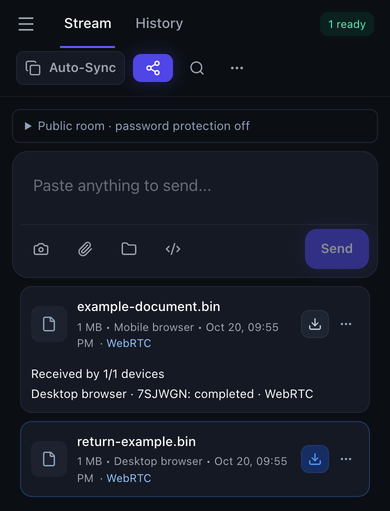
Open Textunnel in iPhone Safari and your PC browser, join the same room and wait for File channel ready. Choose a file on either device. On iPhone, receive it in the browser, then use Download and Save to Files before closing or refreshing Safari.
Choose files to share
Choose files or connect your devices to begin. Keep both pages open during transfer.
Share links and folder packing: up to 256 MiB. For larger single files, and select the file there. The receiver needs supported disk saving.
Direct-first · Internet relay needs permission
How to use it
- Connect both devices to the same Wi-Fi, open the same room and confirm any room password matches.
- On iPhone, use the attachment button to choose a file from Files or your media picker. The picker controls what file representation is selected.
- On the PC, accept the transfer if prompted. Keep Safari in the foreground until receiver verification finishes.
- For PC-to-iPhone transfers, receive in the browser and save to Files. Select that saved file to send it back.
What to check in the room
Limits and connection conditions
Use a current PC browser with WebRTC support. On iPhone, keep Safari active and save received files before refreshing. File size and saving options depend on the receiving browser; use the limits below when choosing a route.
- Text and clipboard messages: 64 KiB encoded message limit
- Use a file for larger content. Clipboard permissions and foreground access still apply.
- MQTT file fallback: 25 MiB per file
- Both peers must explicitly allow relay in their current tabs.
- Share links and folder packing: 256 MiB
- Keep the source page open. Browser memory, storage and network limits apply.
- Room reception above 256 MiB: Supported disk-saving API required
- Choose a receiving browser with disk-saving support for larger files, and check available storage before starting.
- Interrupted-file checkpoints: Up to 256 MiB for 10 minutes
- Return to the page, reconnect, then sender Retry. Cross-refresh recovery requires opting in before transfer; four temporary records maximum, unencrypted at rest.
WebRTC transport is encrypted. Public-room MQTT content needs a room password for encryption against the broker. Internet content relay requires explicit permission in each tab. History and optional recovery use device storage; the site also uses analytics and advertising scripts.
Privacy, relay permission and full transfer guideVerified transfer workflows
Maintained by the Textunnel team · Content reviewed October 23, 2026 · Physical acceptance record: October 18, 2026
In same-Wi-Fi tests between iPhone Safari and Mac: 1 MiB and 64 MiB saved and returned over WebRTC; returned SHA-256 matched the source. A 64 MiB rejection also reached the sender correctly.
These checks confirm the tested workflows, rather than a fixed transfer speed. For interrupted transfers, return to the page, reconnect and ask the sender to Retry.
A separate cloud Windows Server 2025 / Chrome 155.0.8059.85 check passed 1 MiB and 64 MiB file round trips with matching download hashes and a refusal check. It used two browsers on one virtual machine; it does not establish an iPhone-to-Windows or Android physical-device result. Windows environment and results.
Detailed transfer test resultsFrequently asked questions
Is this AirDrop for Windows?
No. This is browser-based WebRTC sharing, not Apple AirDrop. Both devices must open Textunnel and connect. Use a current PC browser with WebRTC support and keep both pages open during transfer.
Why is an old iPhone file card not downloadable?
A refresh can leave a history card without its file bytes. The card explains that the file is unavailable in this page. Ask the sender to send it again, and save before refreshing.
Will a large video continue while iPhone is locked?
Do not rely on that. Locking or backgrounding Safari can interrupt transmission. Return to Safari, wait for the channel to reconnect and ask the sender to Retry. Eligible verified prefixes can resume within the documented limits.